
Earlier audit issues
Retry a room charge an earlier audit could not post, fix the price of a package night, or dismiss an issue you handled another way.
When the audit cannot settle a guest, it carries on with the others and leaves that guest for you. The next sheet lists it as Left from an earlier audit, under Needs a look.
Each row says what went wrong and offers the buttons that fix it. An issue never blocks the next audit.
Before you start
- Permission: Run the night audit. Owners and managers have it by default.
- Retry and Fix price also need Manage reservations.
- Correcting charged nights with Fix price also needs Change the price of booked nights. See Fix price.
- Fix the cause first. Retry never works until the folio can take the charge.
Which button do I use
| What the row says | Button | What it does |
|---|---|---|
| "The folio was closed, so the night could not be charged." | Retry | Posts the night again, after you reopen the folio. |
| "The folio was settled to the city ledger, so the charge could not be posted. Open a third-party folio for the company and route it there." | Retry | Posts the night again, after you open a third-party folio and route the charge to it. |
| "The night's price is less than its inclusions, so it could not be split." | Fix price | Spreads the package price again, then posts the night. |
| Any other issue, or one you handled another way | Dismiss | Closes the issue with a reason. Posts nothing. |
| Any issue | Open | Opens the reservation, so you can look first. |
Every row also has Dismiss and Open.
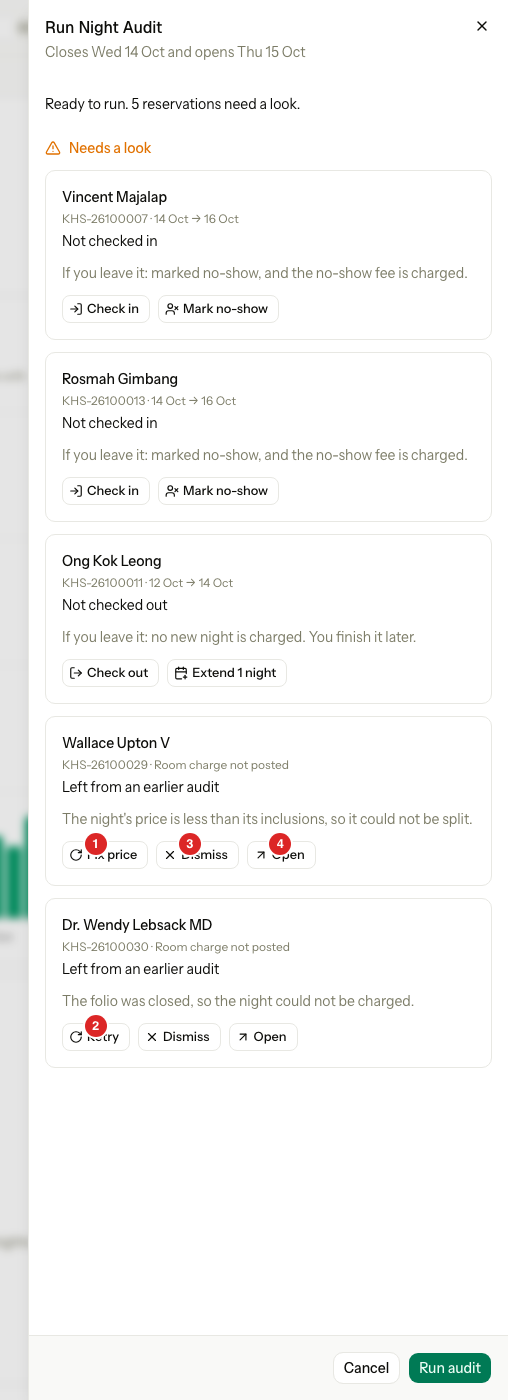
A reservation with several issues shows one entry for each issue. Each entry names the date of its audit.
Retry a room charge
Use Retry when the audit could not charge a night, for example because the folio was closed.
A closed day takes no new postings. So the night is charged today, on the current business date, and its line says which night it is for. A night of 8 Oct reads "Room · night of 8 Oct".
- Fix the cause. If the folio is closed, reopen it. See Close and reopen. If it was settled to the city ledger, open a third-party folio for the company and route the charge to it. See Routing.
- Open Run Night Audit.
- On the row, select Retry.
The night is charged and the row leaves the sheet. If it was already charged, the row simply leaves. Two clicks charge once.
If Estatell cannot charge the night, nothing changes and the row stays. The sheet says why, in words.
Fix price on a package night
A package stay shares its price over its nights. An old package stay may have been split evenly, so a night costs less than the meals and extras the package includes. Estatell then cannot post that night, and Retry can never work. The row shows Fix price instead.
Fix price spreads the same package price over the nights again, so each night covers its own inclusions. The package total never changes. Then it charges the night.
- Open Run Night Audit.
- On the row, select Fix price.
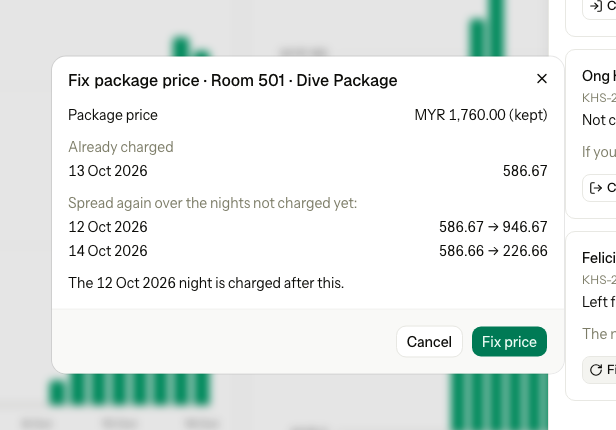
- Read the preview. It shows each night's old price and new price.
- Select Fix price.
Estatell shows one of two previews.
The nights left can cover their inclusions
Only the nights that are not charged yet change. Charged nights stay as they are.
The nights left cannot cover their inclusions
The whole stay is spread again. Charged nights whose price changes are corrected: Estatell reverses each one and posts it again at its new price.
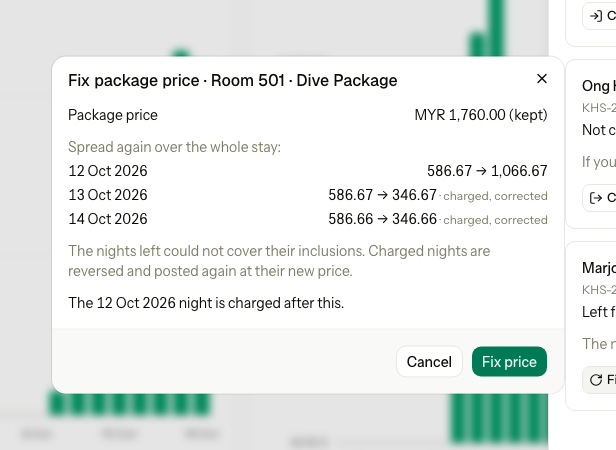
This needs Change the price of booked nights, because it does what Change the price of a night does. Without it, the preview still shows the spread. It says "Correcting charged nights needs the Change price permission." and Fix price is off. Ask a manager.
Dismiss an issue
Use Dismiss for an issue you handled another way, for example a night you charged by hand. It posts and reverses nothing.
-
Open Run Night Audit.
-
On the row, select Dismiss.
The dialog is Dismiss audit exception.
-
Enter a Reason.
-
Select Dismiss.
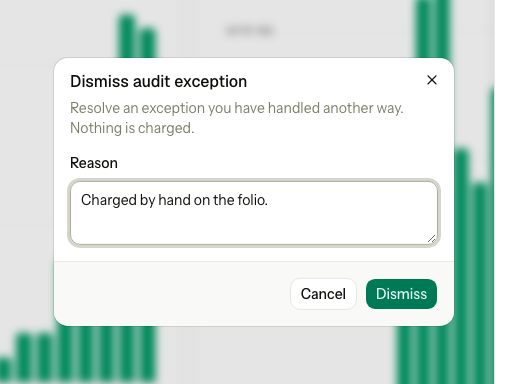
The reason is saved in the reservation's activity log, with your name.
Why a fix is refused
A refused fix changes nothing. The sheet shows the reason and reloads.
| What the sheet says | Why | What to do |
|---|---|---|
| "There is nothing left to fix here. The list has been refreshed." | Someone already fixed or dismissed the issue. | Nothing. |
| "The unit was not in a state that could be charged." | The guest is no longer checked in or checked out, for example the stay was cancelled. | Select Dismiss. |
| "The folio was closed, so the night could not be charged." | Retry met a closed folio again. | Reopen the folio, then select Retry. |
| "The folio was settled to the city ledger, so the charge could not be posted. Open a third-party folio for the company and route it there." | The folio cannot take new charges. | Route the charge to a third-party folio, then select Retry. |
| "The night's price is less than its inclusions, so it could not be split." | Retry cannot change a price. | Select Fix price. |
| "This exception is not a package night whose price needs fixing." | Fix price was used on an issue it does not fit. | Use Retry, or change the price. See Change the price of a night. |
| "The package price left (MYR 1,273.34) cannot cover these nights' inclusions. Change the price with Change price." | The whole package is too small for what it includes. | Raise the price of the nights. See Change the price of a night. |
| "Correcting charged nights needs the Change price permission." | The whole stay must be spread again, and you lack the permission. | Ask an owner or manager. |
| "Enter a reason to dismiss this exception." | The Reason is empty. | Type a reason. |
When an issue goes away by itself
An issue leaves the sheet when you retry, fix or dismiss it.
Two kinds leave by themselves. A Missed arrival not resolved issue leaves when the guest is no longer waiting to check in, for example after a check-in, a cancellation or a no-show. An Overdue departure not resolved issue leaves when the guest is no longer checked in, for example after check-out. The sheet stops listing them at once, and the next run closes them for good.
Special cases
| Situation | What happens | What to do |
|---|---|---|
| The row says Overdue departure not resolved | The guest stayed past the departure date and your rule blocks extending. | Check the guest out. The row leaves the sheet. |
| The row says Add-on not posted | A scheduled add-on could not be charged. | Post the add-on by hand, then select Dismiss. See Post charges. |
| The row says Unexpected error | The audit hit an error on one guest. | Look at the reservation. Fix what is wrong, then select Dismiss. |
| You charged the night by hand | Retry would charge it twice. | Select Dismiss and give the reason. |
| A package night shows Retry, not Fix price | The night's price is not the problem. | Fix the cause the row names, then select Retry. |
| You have Run the night audit but not Manage reservations | Retry and Fix price are refused. Dismiss works. | Ask a manager, or dismiss. |
| Several issues on one reservation | One entry for each issue, with the date of its audit. | Treat each entry on its own. |