
Edit on the Timeline
Drag a stay to another room, change its dates by dragging an edge, or click an empty cell to book or block a room.
You can change a stay straight on the Timeline View. Drag the bar to another room, drag an edge to change a date, or click an empty cell to start a booking or block the room. Every change asks you to confirm first. Nothing saves until you do.
The rules are the same as on the reservation page. See Change a stay.
Before you start
- Permission: Manage reservations. Owners, managers and front desk staff have it by default. Without it, a bar only opens the peek sheet.
- To block a room from an empty cell, you also need Block rooms and beds.
- To book past a rate restriction, such as a minimum stay, you also need Book past rate restrictions.
- Dragging works with a mouse or a trackpad, on a screen wider than a phone.
What you can drag
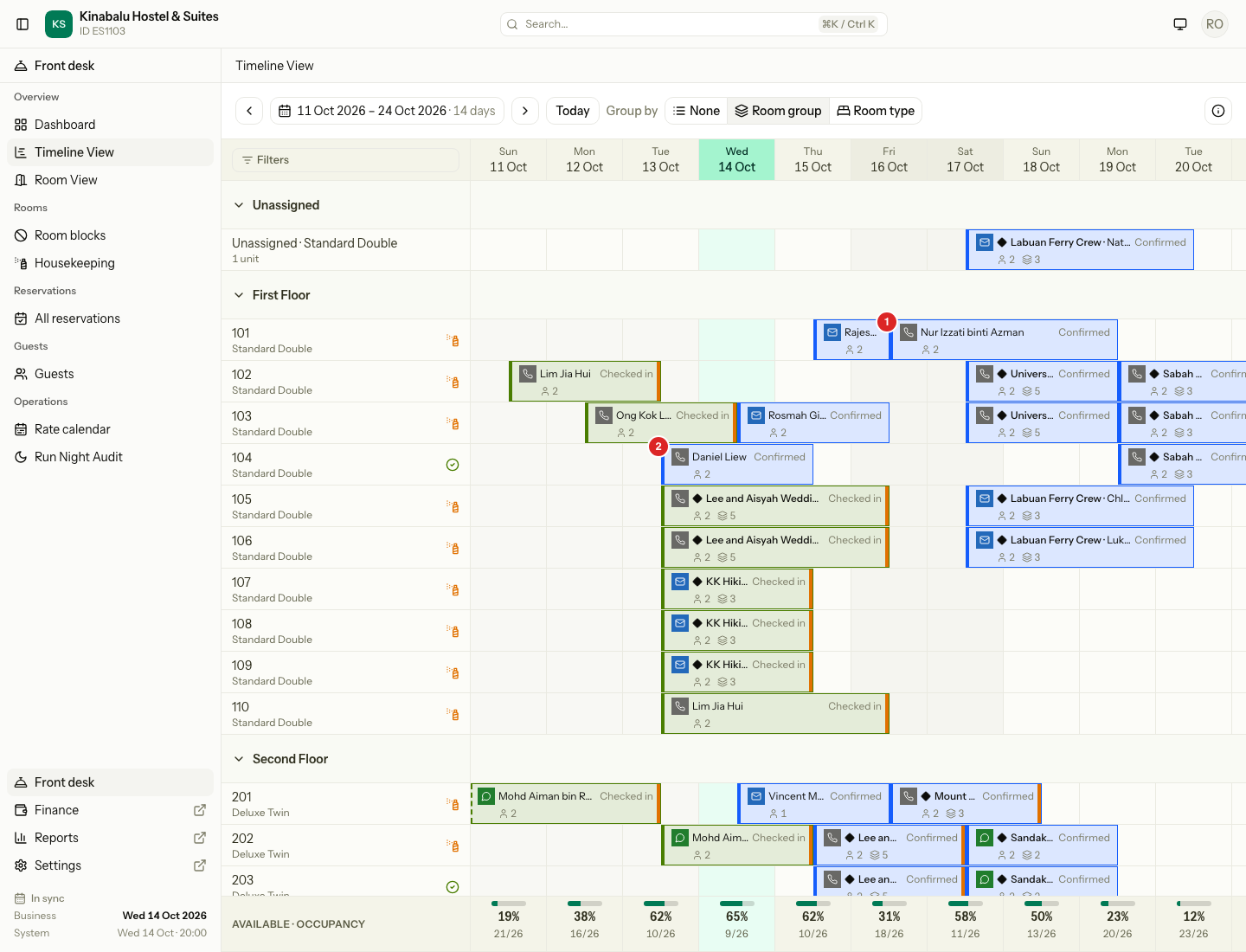
| You drag | What happens | Booking (Confirmed) | Guest in house (Checked in) |
|---|---|---|---|
| The bar up or down (1) to another room (2) | The stay moves room. Dates stay the same. | Yes | Yes, from the night you drop on |
| The bar from the Unassigned lane to a room | The stay gets its first room. No reason is needed. | Yes | Not in the lane |
| The right edge of the bar | Changes the departure. Later extends the stay. Earlier shortens it. | Yes | Yes. Earlier is an early departure. |
| The left edge of the bar | Changes the arrival. | Yes | No. The arrival is locked. |
| The bar sideways | Moves arrival and departure by the same number of days. The room stays. | Yes | No |
| The bar sideways and to another room | Moves the dates and the room together. | Yes | No |
A drag changes the room or the dates, not both. The one exception is a Confirmed bar dragged sideways and up or down. That changes both.
A sideways drag moves the bar by whole days.
Steps
- Point at the bar, or at the thin strip on its left or right edge. The pointer changes on an edge.
- Drag. A dashed outline shows where the stay will go. For a room move, rooms that cannot take the stay turn grey.
- Drop the bar. A dialog opens.
- Check the dialog. Fill in the Reason if it asks for one.
- Select the button that saves, for example Move room, Save dates or Move stay. Press Enter to do the same.
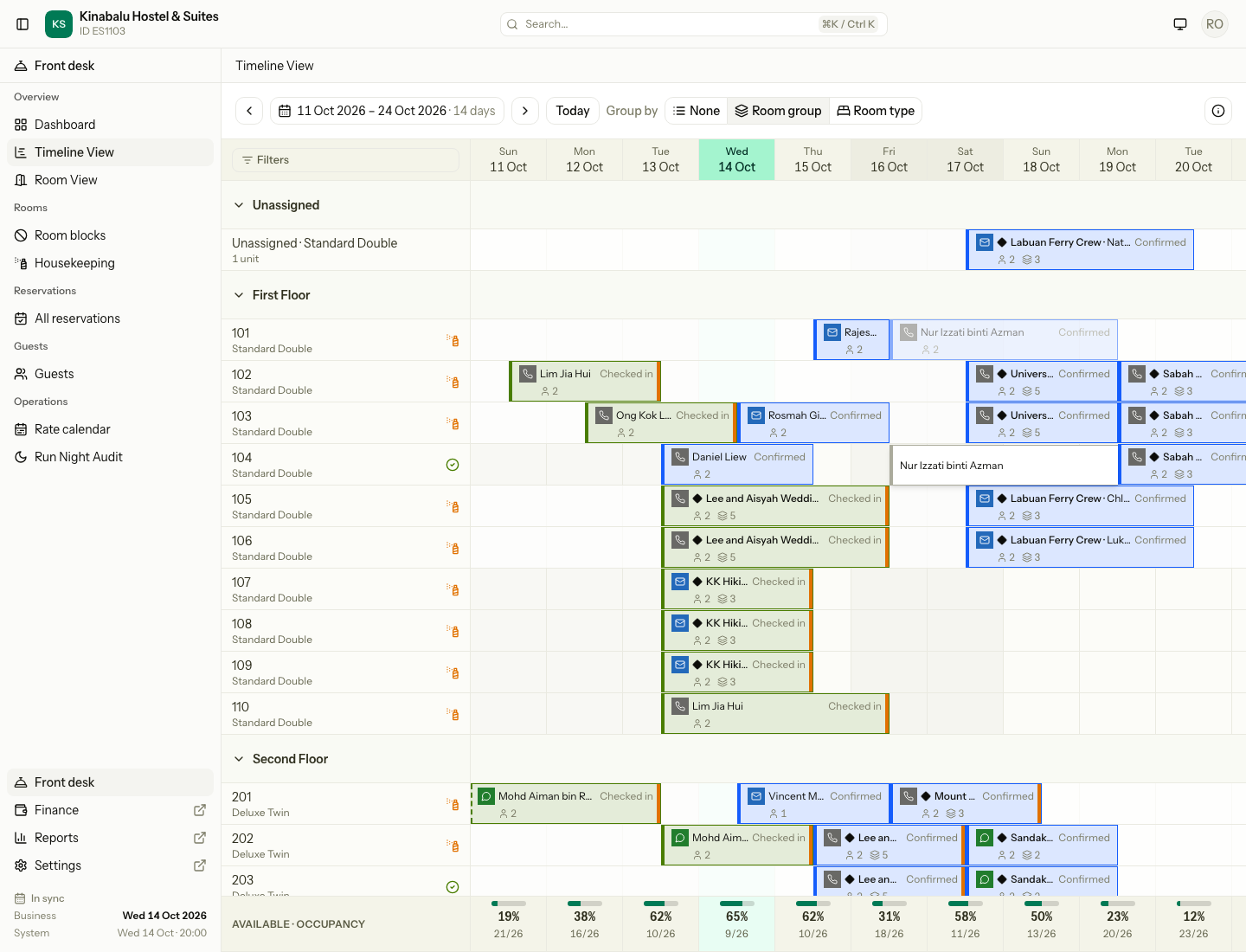
To stop, select Cancel, close the dialog, or press Esc. The bar goes back and nothing changes.
Move to another room
Drop the bar on another room's row. The dialog is called Move to Room 104.
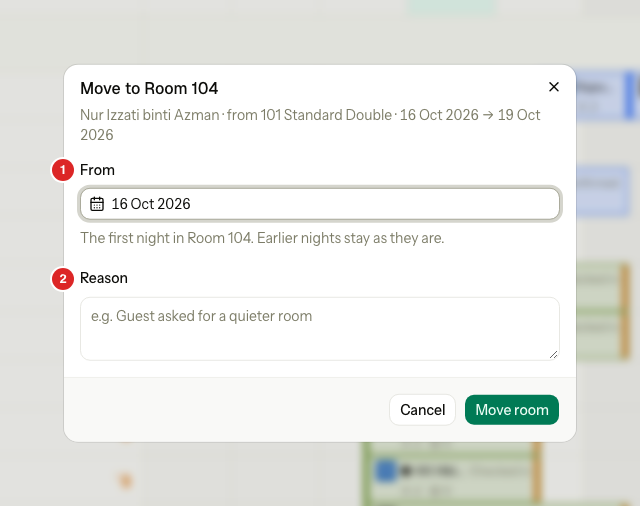
| Field | What it means |
|---|---|
| From | The first night in the new room. Nights before it stay in the old room, so you can split a stay between two rooms. |
| Reason | Why the guest moves. It is required, except for a first room. |
- For a booking, From is the first night you can move. The whole stay moves. Change From to split it.
- For a guest in house, From is the night under the pointer. A column in the past means tonight.
- A guest in house moves from tonight or later. Drop on tomorrow's column to keep the guest in the old room tonight.
- A guest in house can change room type only on the arrival night, because the move must cover the whole stay.
- A booking can move to another room type that its rate plan sells. The move covers the whole stay.
- Beds move to beds. Rooms move to rooms. In a group, each unit moves alone.
- If the new room is dirty, the dialog warns you. You can still move.
Change the dates
Drag the right edge to change the departure. Drag the left edge to change the arrival. The dialog is called Change dates.
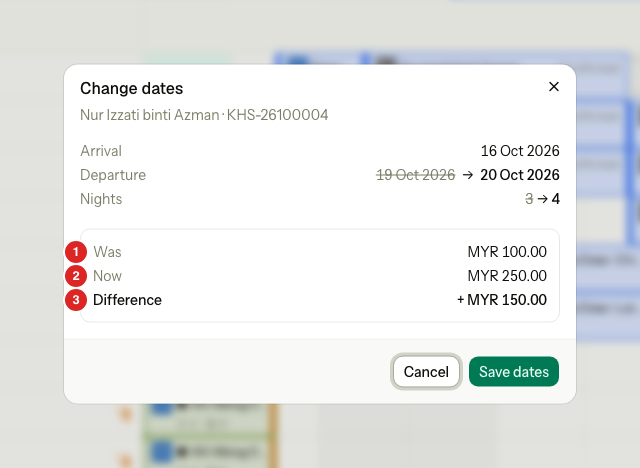
| # | Line | What it shows |
|---|---|---|
| 1 | Was | The price before the change. |
| 2 | Now | The price after the change. |
| 3 | Difference | What the guest pays more or less. |
- Added nights are priced at today's rates, for the added nights only. Nights you keep keep their price.
- A night you add keeps the room next to it when that room is free. If not, the dates still save and the night has no room. Assign one after. See Assign rooms and beds.
- A stay is at least one night. You cannot drag the right edge before the arrival.
- A shorter stay for a guest in house is an early departure. The dialog shows the early departure fee, and Do not charge with a required Reason. If the fee is zero, the fee block is hidden.
- A shorter stay for a booking has no fee. The guest has not arrived.
If the night is sold out, or has no price, a message shows and the bar goes back.
Move the dates and the room together
Drag a Confirmed bar sideways and onto another row. The dialog is called Move stay.
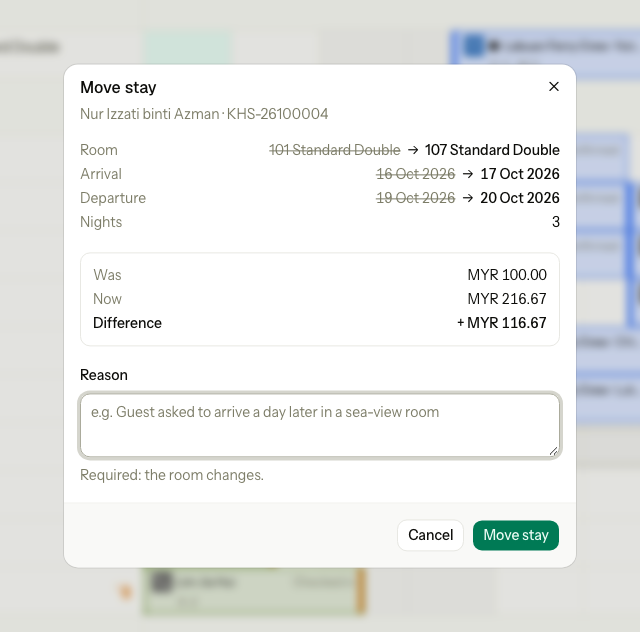
- The dialog shows the old and new room, the dates, the nights and the price.
- Reason is required when the room changes. It is not needed when only the dates move.
- Moving the arrival is a new booking of the unit, so there is no fee.
- If any part is refused, nothing saves. The room and the dates both stay as they were.
Past dates
Today means the business date, not the clock. Between midnight and the night audit, today is still the day before.
- Past columns are not places to drop. A click on an empty past cell does nothing.
- A bar or an edge stops at the business date. It does not follow the pointer into the past.
| You drag | Booking | Guest in house |
|---|---|---|
| Up or down, dropped on a past column | Not possible. A booking has no past nights. | Moves from tonight. Past nights keep the old room. |
| The left edge into the past | Stops at today. | No handle. |
| The right edge into the past | Stops at tomorrow. | Stops at today. Leaving today is an early departure. |
| Sideways into the past | The arrival stops at today. | Not possible. |
For a stay that already happened, use the Past stay booking form. See Past stay.
Rate restrictions
Before the dialog opens, Estatell checks the new nights against the rate restrictions, such as a minimum stay.
| You | What happens |
|---|---|
| Do not have Book past rate restrictions | A message explains the rule. The bar goes back. No dialog opens. |
| Have Book past rate restrictions | The dialog shows a warning and a required Override reason, for example "Regular guest, manager approved". The reason is logged. |
A room move adds no nights, so it never meets a restriction.
Who cannot be dragged
| Bar | Result |
|---|---|
| You do not have Manage reservations | No drag. Select the bar to open the peek sheet. |
| Checked out, cancelled or no-show | No drag. |
| A day use marker or a block | No drag. |
| A package plan | Up or down only. The nights are fixed. |
| A bar cut by the edge of the window | Up or down only. Move the window first to see both edges. |
| A phone screen | No drag. Use the reservation page. |
Click an empty cell
Select an empty cell on today or a later day. A small menu opens with the room and the date.
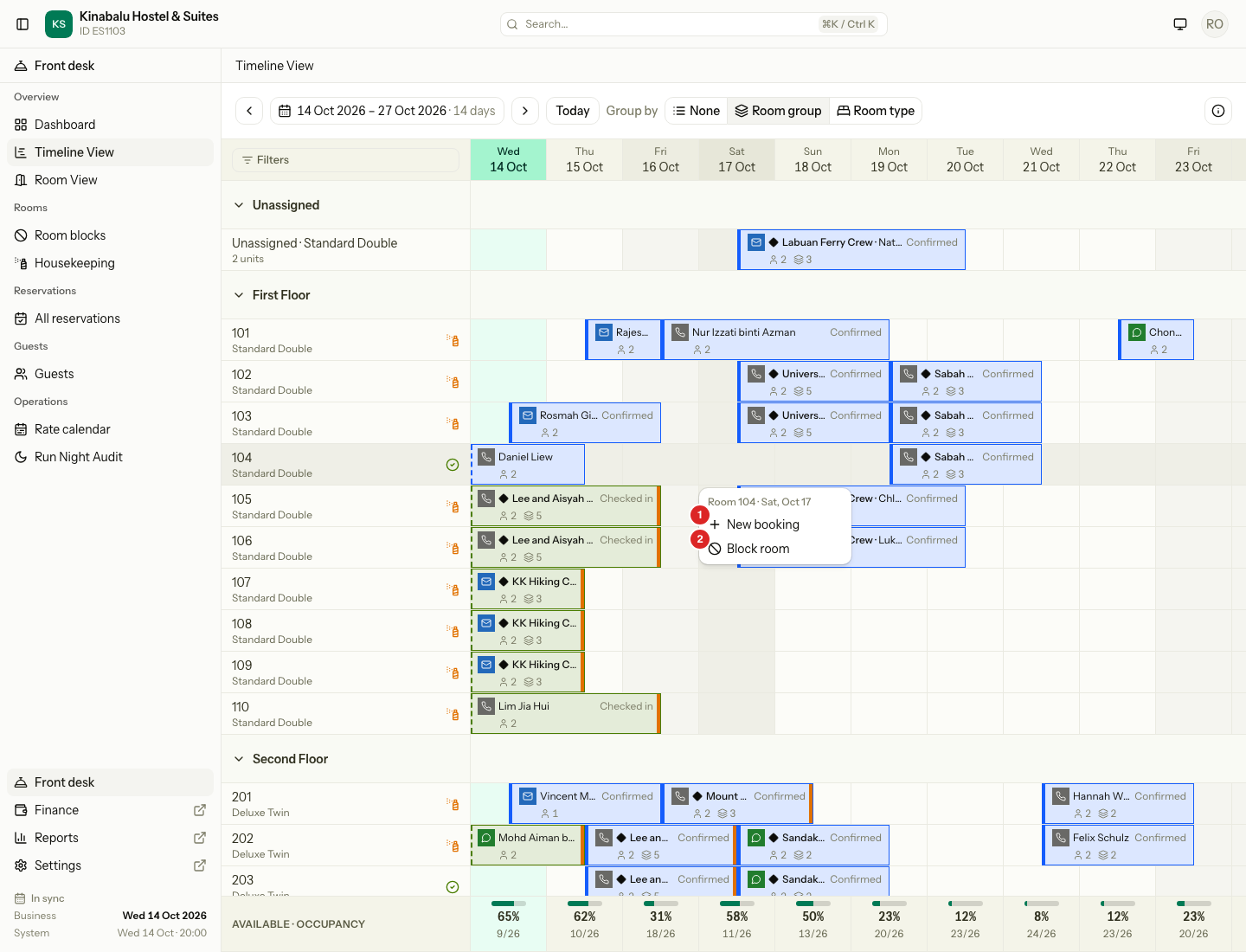
| # | Action | What it does | Needs |
|---|---|---|---|
| 1 | New booking | Opens the booking form with the arrival, the departure the next day, and the room or bed already filled in. | Manage reservations |
| 2 | Block room | Opens the Block room dialog for this room and night. | Block rooms and beds |
- With only one action to show, the click runs it at once and no menu opens.
- A cell that holds a stay or a block takes no click. A cell where a guest leaves that morning does, because the room is free for the new night.
- From the booking form, the back arrow and Cancel return you to the Timeline.
- Block room starts on the property's calendar date. Before the night audit runs, yesterday's cell offers only New booking.
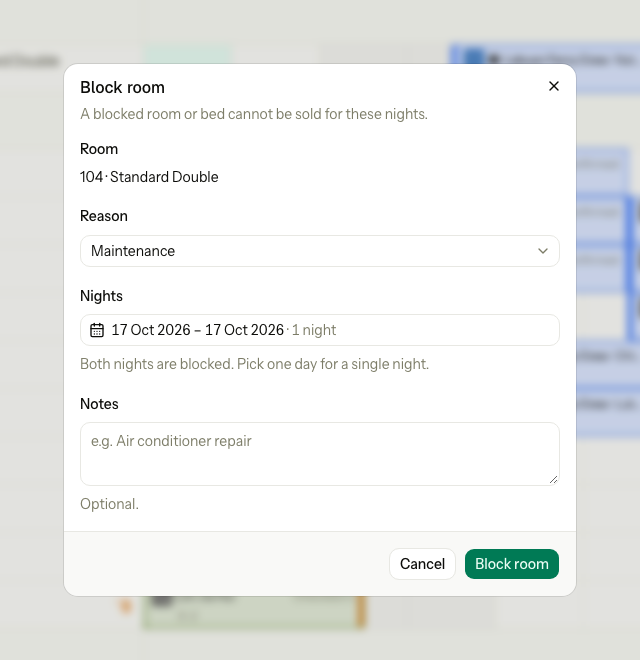
The dialog has the room (fixed), the Reason, the Nights and Notes. The night starts as the one you selected. Widen it to block more nights. On a bed row, the dialog starts on that bed and also offers the whole room and the other beds.
A block fails if the room already has a block or a stay on those nights. See Room blocks for ending and cancelling a block.
Special cases
| Situation | What happens | What to do |
|---|---|---|
| The new room is taken for those nights | A message such as "104 Standard Double is not free on 19 Oct 2026." The bar goes back. | Pick another room, or move the other stay first. |
| Someone else takes the room while the dialog is open | A message says the room is no longer free, and the grid reloads. | Pick another room. |
| The night audit runs while you drag | The change is refused with a message and the bar goes back. | Drag again. |
| You drop on the same date or the same room | Nothing changes. | Nothing. |
| You drop on an Unassigned lane or a group heading | Nothing changes. | Drop on a room or bed row. |
| The room is dirty for tonight | The dialog warns you. You can still save. | Tell housekeeping. |
| A guest in house wants another room type | It must start on the arrival night. | Move within the room type, or use the reservation page. |
| The room type is not on the rate plan | The move is refused. | Choose a room type the plan sells. |
| You need to change more than the window shows | A bar stops at the edge of the window. | Move the window, or use Change dates on the reservation page. |
| One room of a group | Only that unit changes. | Drag each unit that must change. |
| A sold-out night, or no price | A message shows and the bar goes back. | Pick other dates, or set the price on the rate calendar. |