
Overview
Check out a guest on the departure date, collect the balance and give back the deposit.
Check out a guest when they leave. In one step you collect what they owe, use or refund the deposit, and close the unit's folio. The unit becomes Checked out and the room becomes Dirty for housekeeping.
| Situation | Use |
|---|---|
| The guest leaves on the departure date | Check out, on this page |
| The guest leaves before the departure date | Early departure |
| The guest checked in today and leaves before midnight | Check out as day use |
| The guest wants to stay a few hours longer today | Late check-out |
| The guest was due to leave yesterday and is still checked in | Overdue stays |
| A group leaves together | Group check-out |
| You checked out the wrong unit today | Undo check-out |
Before you start
- Permission: Check out units. Owners, managers and front desk staff have it by default.
- To collect money you need Record payments and download receipts. To give money back you need Refund payments.
- The unit must be Checked in. Check out shows in the menu from the departure date.
How check-out works
Steps
- Open the reservation.
- Open the check-out form:
-
For a reservation with one unit, select More, then Check out.
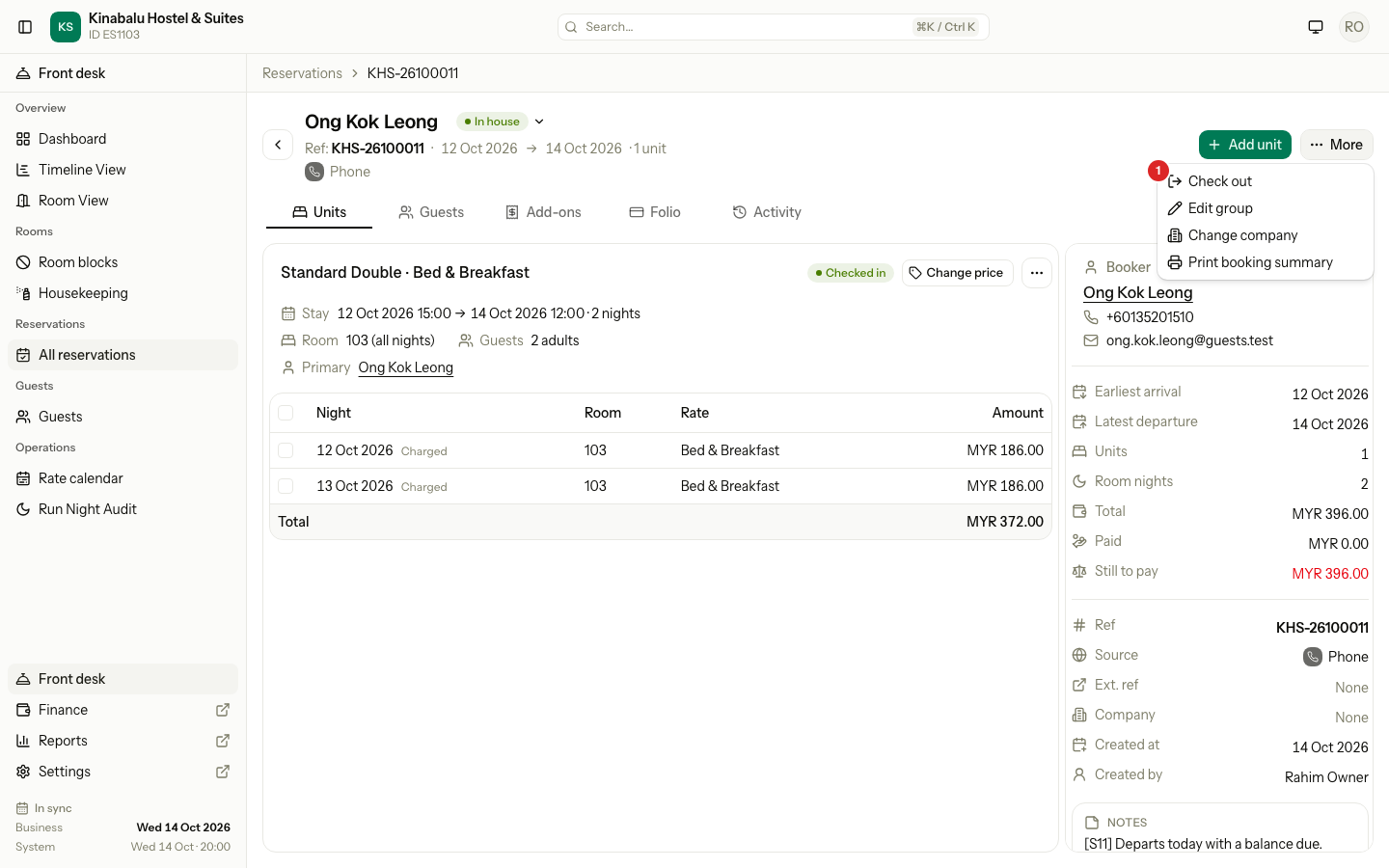
-
For a group, select the ⋯ menu on the unit, then Check out.
-
- Check the bill on the right: Charges, Paid, Deposit held, then To pay, Credit or Settled.
- If the guest paid a deposit, choose what happens to it under Security deposit. See Security deposit below.
- Settle the balance: collect what the guest owes, or refund what they paid too much. See Balance below.
- Check Remaining after check-out. It must be MYR 0.00.
- Select the green button. It names the steps, for example Collect and check out or Refund and check out.
Balance
The form reads the unit's folio and shows one of three states. Each example uses the same stay: charges of MYR 396.00.
| Balance | The guest paid | The form shows | Button |
|---|---|---|---|
| The guest owes money | Nothing | To pay MYR 396.00 and Collect balance | Collect and check out |
| The guest paid more | MYR 500.00 | Credit MYR 104.00 and Refund credit | Refund and check out |
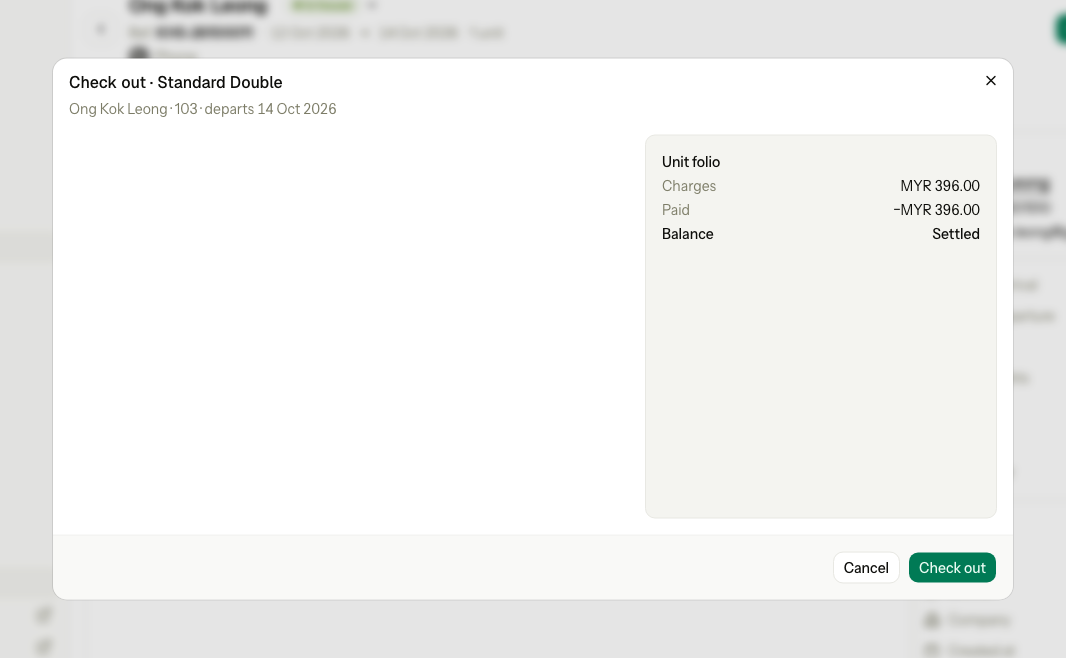
| Nothing to settle | MYR 396.00 | Balance Settled | Check out |
The guest owes money
The guest pays the balance at the desk.
- Check Collect balance. It is the whole balance and cannot be changed.
- Choose the Method. For card, transfer or e-wallet, enter the Reference.
- Select Collect and check out.
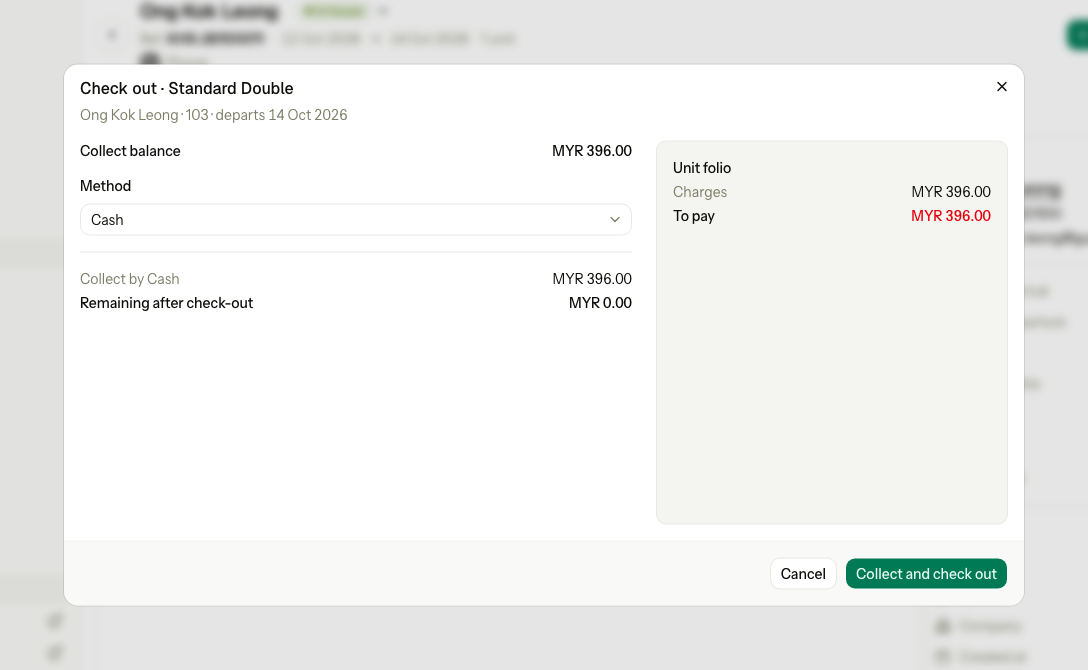
If the guest pays only part, record that payment on the folio first. Then collect the rest here, or move it to the group bill.
The guest paid more
The guest paid more than the bill, for example a prepayment for a stay that got cheaper. The folio holds a Credit.
- Check the lines under Refund credit. Each payment goes back by its own method, for example Advance · Cash.
- Select Refund and check out.
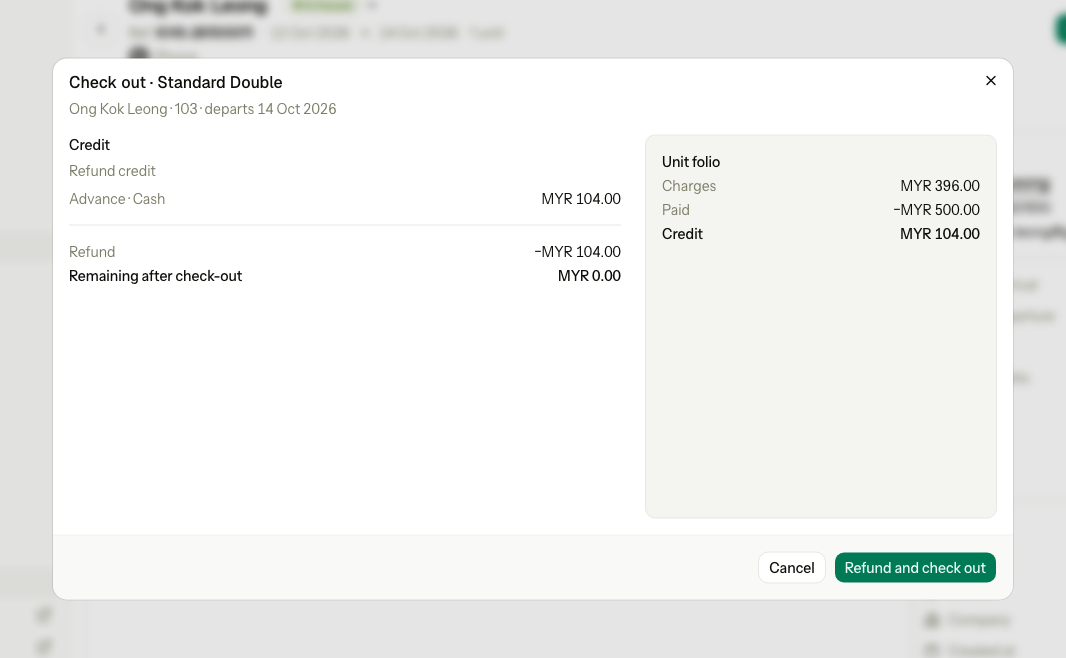
- The whole credit is refunded. The amount cannot be changed, because any other amount leaves the folio open.
- To refund by another method, for example cash for a card payment, use Refund credit on the folio first. Then check out.
- If part of the credit came from the city ledger, the form says "Part of this credit cannot be refunded here. Open the folio."
Nothing to settle
The guest paid exactly the bill, for example in advance. The bill shows Balance Settled. There is nothing to collect or refund.
- Check the bill on the right.
- Select Check out.
Security deposit
When the guest paid a deposit, the form asks "What should happen to the deposit?". The section shows only if you may refund payments.
The examples below use the same stay: charges of MYR 396.00 and a deposit of MYR 100.00 paid in cash.
| Choice | Deposit | The guest pays | Button |
|---|---|---|---|
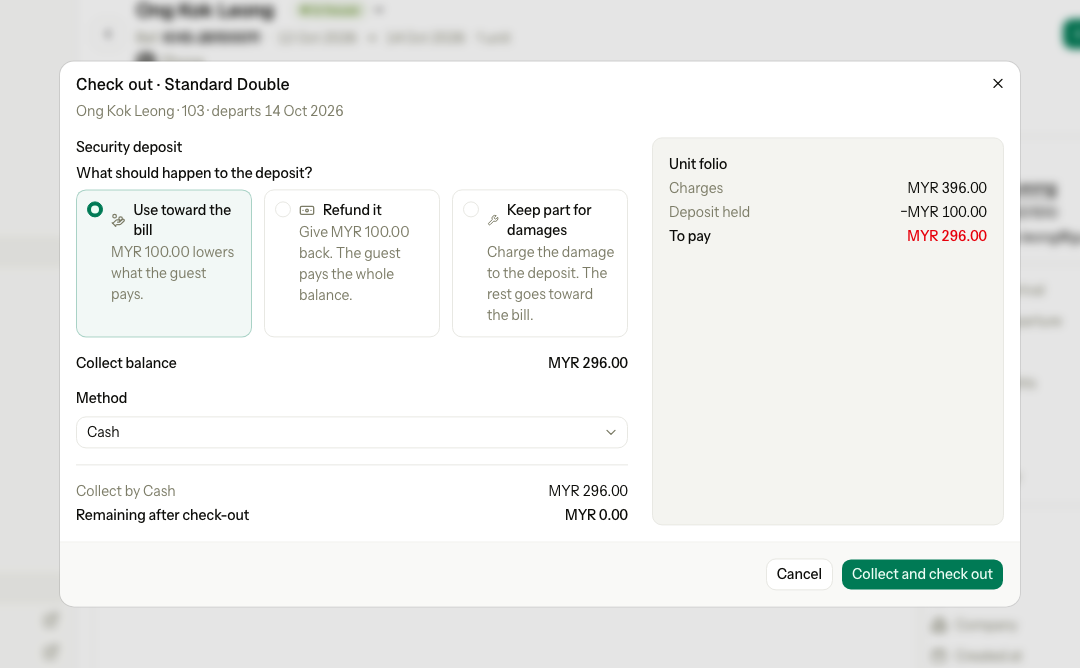
| Use toward the bill | Pays part of the bill | MYR 296.00 | Collect and check out |
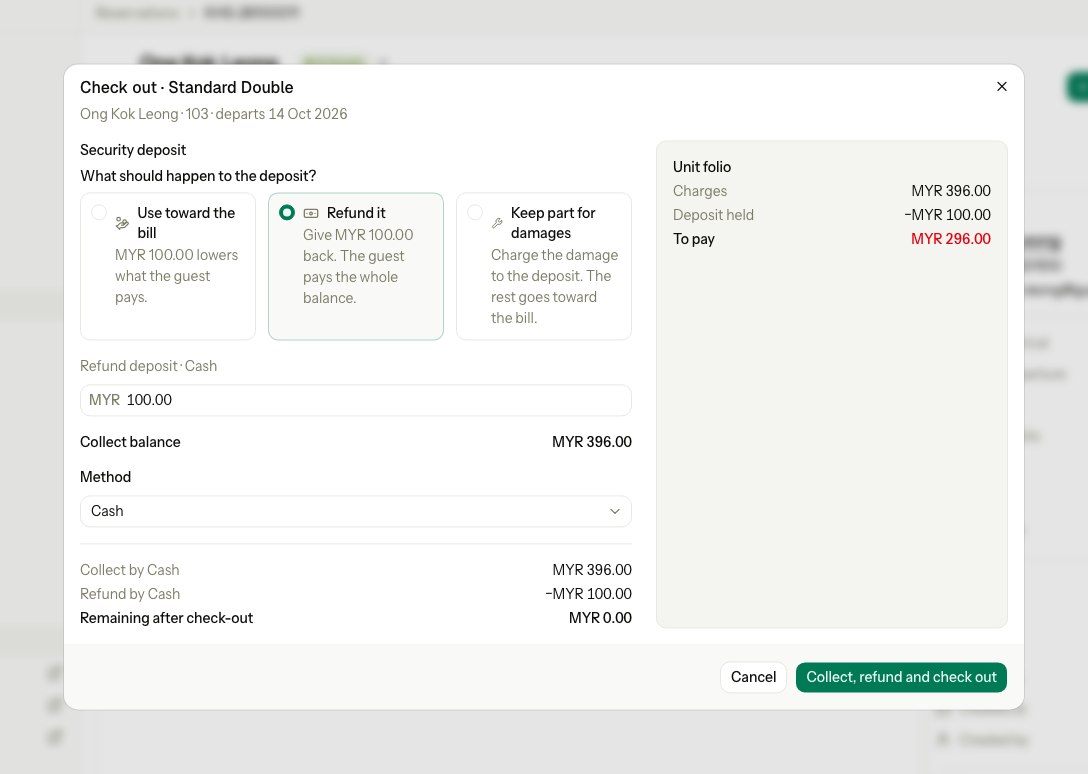
| Refund it | Given back in cash | MYR 396.00 | Collect, refund and check out |
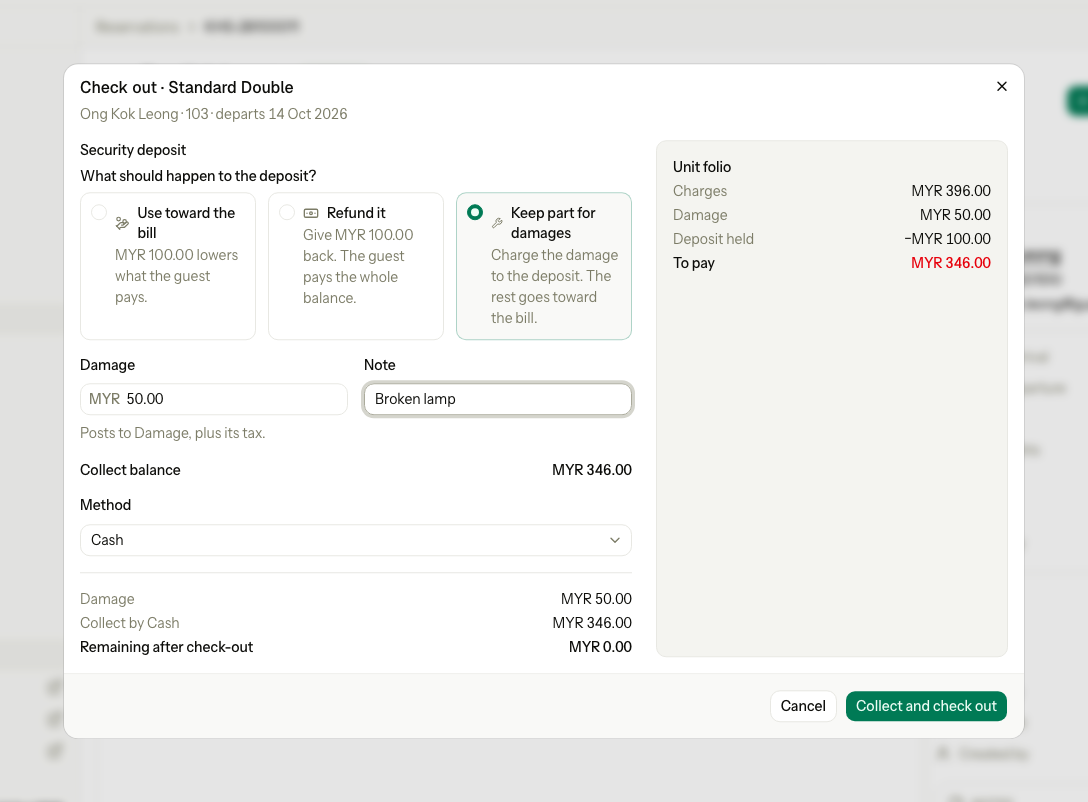
| Keep part for damages | Pays the damage, then part of the bill | MYR 346.00, with MYR 50.00 damage | Collect and check out |
Use toward the bill
The default when the guest owes money. The deposit lowers what the guest pays.
- Leave Use toward the bill selected.
- Collect the rest by the Method you choose.
Refund it
The deposit goes back to the guest, by the method they paid it with. The guest pays the whole bill.
- Select Refund it.
- Check the amount under Refund deposit. You can lower it to refund only part.
- Collect the whole balance by the Method you choose.
Keep part for damages
The guest damaged something. Estatell posts a Damage charge with its tax. The deposit pays the damage first, then the rest of the bill.
- Select Keep part for damages.
- Enter the Damage amount, before tax.
- Enter a Note, for example "Broken lamp". It shows on the folio line.
- Collect the rest by the Method you choose.
You need Post charges to folios to see this choice. Owners, managers and front desk staff have it by default.
Other cases
| Situation | What the form shows |
|---|---|
| The deposit already covers the bill | "MYR 100.00 used toward the bill. Nothing to refund." and a Keep part of it for damages box. |
| The guest paid more than the bill | Only a refund. There is no choice to make. |
| The damage is more than the deposit | Nothing is refunded. The guest pays the rest. |
Pay later
A guest cannot check out while their own folio still owes money. To let someone pay later, move the charges to another folio first. The guest's folio drops to 0, and the debt waits on the other folio.
| Who pays later | Where the debt goes | How it is paid |
|---|---|---|
| The guest, or another person | A third-party folio with that guest as payer | Record a payment on that folio when they pay. Then close it at 0. |
| A company with City ledger billing | A third-party folio with the company as payer, then Settle to City ledger | The company pays its invoice. See AR invoices and payments. |
| The group (a group booking) | The group bill. Use Add to group bill on Group check-out. | The group bill is settled with the group. |
You need Transfer folio lines and manage routing. Owners and managers have it by default. Front desk staff do not.
Move the charges to a third-party folio
- Open the reservation and select the Folio tab.
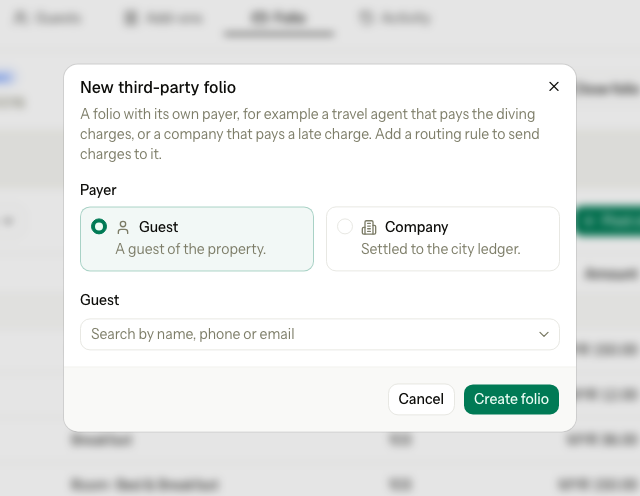
- Select More actions, then Third-party folio.
- Under Payer, choose Guest or Company, then pick who pays.
- Select Create folio.
- Select More actions, then Move charges. Move the guest's charges to the new folio. See Move charges.
- Check that the unit folio shows MYR 0.00.
- Check the guest out as normal. The form shows Settled.
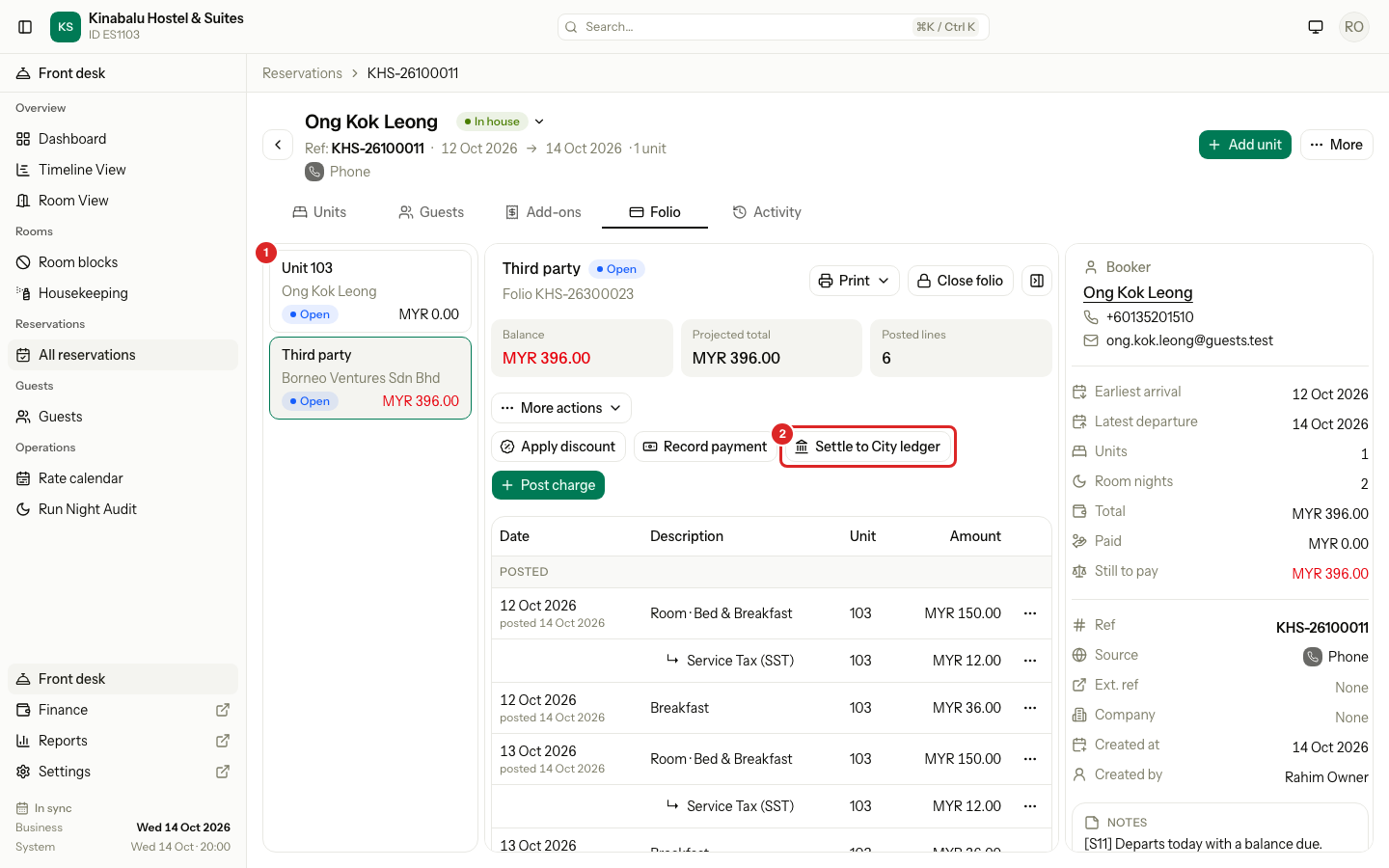
After the move, the unit folio (1) is at 0 and the third-party folio holds the debt. Check-out closes only the unit folio, so the third-party folio stays Open.
Settle a company folio to the City ledger
When the payer is a company with City ledger billing, the third-party folio shows Settle to City ledger (2).
You need Settle folios to City ledger and void AR invoices. Owners, managers and finance staff have it by default.
- Open the company's third-party folio.
- Select Settle to City ledger.
- Read the message. It names the company and the amount it will owe.
- Select Settle to City ledger.
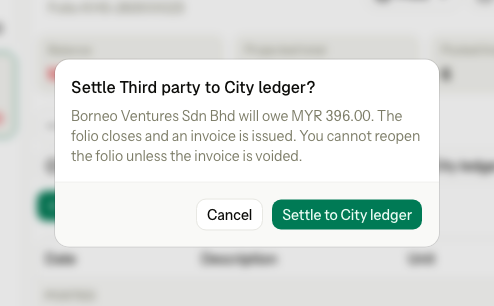
The folio closes and the company gets an invoice. You can settle before or after the guest checks out.
Things to know
| Situation | What happens | What to do |
|---|---|---|
| A guest payer still owes after the stay | The night audit shows a "Master folio not billed" warning every night until the folio is paid. It never blocks the audit. | Record the payment when the guest pays. |
| You want reminders and an ageing report | A guest's third-party folio has no invoice and no ageing. | For credit terms, bill a company with City ledger billing instead. |
| The company cannot be billed | The company is not active, or City ledger billing is off. | Ask a manager to turn on City ledger billing for the company. |
| A late charge after the company was invoiced | The settled folio cannot reopen. | Create a second third-party folio for the company, move the charge there and settle it too. |
| A front desk user | Third-party folio and Move charges are not in the menu. | Ask a manager. |
What happens
- The payment, the refund and the check-out are saved together. If one is refused, nothing is saved.
- The unit becomes Checked out. When every unit is out, the reservation is Completed.
- The unit's folio closes and gets its invoice number.
- The room becomes Dirty.
- A balance on the group bill (the Master folio) does not stop the check-out. It is settled with the group.
Special cases
| Situation | Example | What happens | What to do |
|---|---|---|---|
| The guest leaves before the departure date | Booked to 16 Oct, leaves on 14 Oct. | • The form opens as Early check-out. | • See Early departure. |
| You cannot collect money | A user without Record payments. | • "Collect the balance with Record payment on the folio." | • Ask someone who may record payments. |
| A charge posted while the form was open | A colleague posts a minibar charge. | • "The unit folio is not settled. Collect the balance or refund the deposit first." | • Close the form and open it again. |
| Another room charges this folio | Room 106 pays for room 107. | • "Room 107 still charges its scheduled nights to this folio. Send them to another folio first." | • Select Move charges and move them first. |
| Too early | The departure date is tomorrow. | • "The guest cannot check out before the departure date. Change the dates first." | • Use early check-out, or wait. |
| The guest arrived today and leaves tonight | Checked in at 14:05, leaves at 18:20. | • Check out is greyed out: there is no night to remove. | • Use Check out as day use. |
| After midnight, before the night audit | The guest leaves at 1 am on 15 Oct. The night audit for 14 Oct has not run. | • A note says the night of 14 Oct is added to the bill now. | • Check out as normal. The night audit skips that night. |
| The company pays | The room charges go to the company's folio. | • Only the guest's own charges show, such as the minibar. | • Collect those. The company is billed with the group. |