
Routing
Choose who pays what. Send room charges to a company, a travel agent or one guest's own bill, and bill one guest separately.
Routing decides which folio takes each new charge. Use it when someone other than the guest pays: a company pays the rooms, a travel agent pays the diving trips, or one guest pays for another guest's room.
A routing rule only sends charges that post later. Charges already on a folio stay where they are. To move those, use Move charges.
Before you start
- Permission: Transfer folio lines and manage routing. Owners, managers and finance staff have it by default.
- To pick a company as a payer you also need to view companies.
- The folio that receives the charges must be Open.
How a charge finds its folio
Estatell looks at one rule and stops. A rule never sends a charge on to a second folio.
Billing modes
A group booking, or a booking with a company, has a Billing mode. The mode makes its own rules for you. You set the mode when you create or change the booking. See Group bookings.
| Billing mode | Room charges go to | Other charges go to | Rule it makes |
|---|---|---|---|
| Master folio pays | The Master folio | Each room's own folio | Room charges to the Master folio |
| Master folio pays all | The Master folio | The Master folio | All charges to the Master folio |
| Each unit pays | Each room's own folio | Each room's own folio | None |
- The Master folio exists when the booking has 2 or more rooms that are not cancelled or no-show, or when it has a company.
- If a folio already holds money for a room, you cannot change the mode. The money would stay behind. Refund it or move it first.
- If you add a room and a room's own folio holds an advance, estatell saves the change and shows a warning that names the advance. The advance can no longer meet that room's charges. Move the room charges back to the room's own folio with Move charges, or refund the advance.
Make a third-party folio
A third-party folio is a bill for someone who is not staying in a room. Its payer is a guest or a company.
-
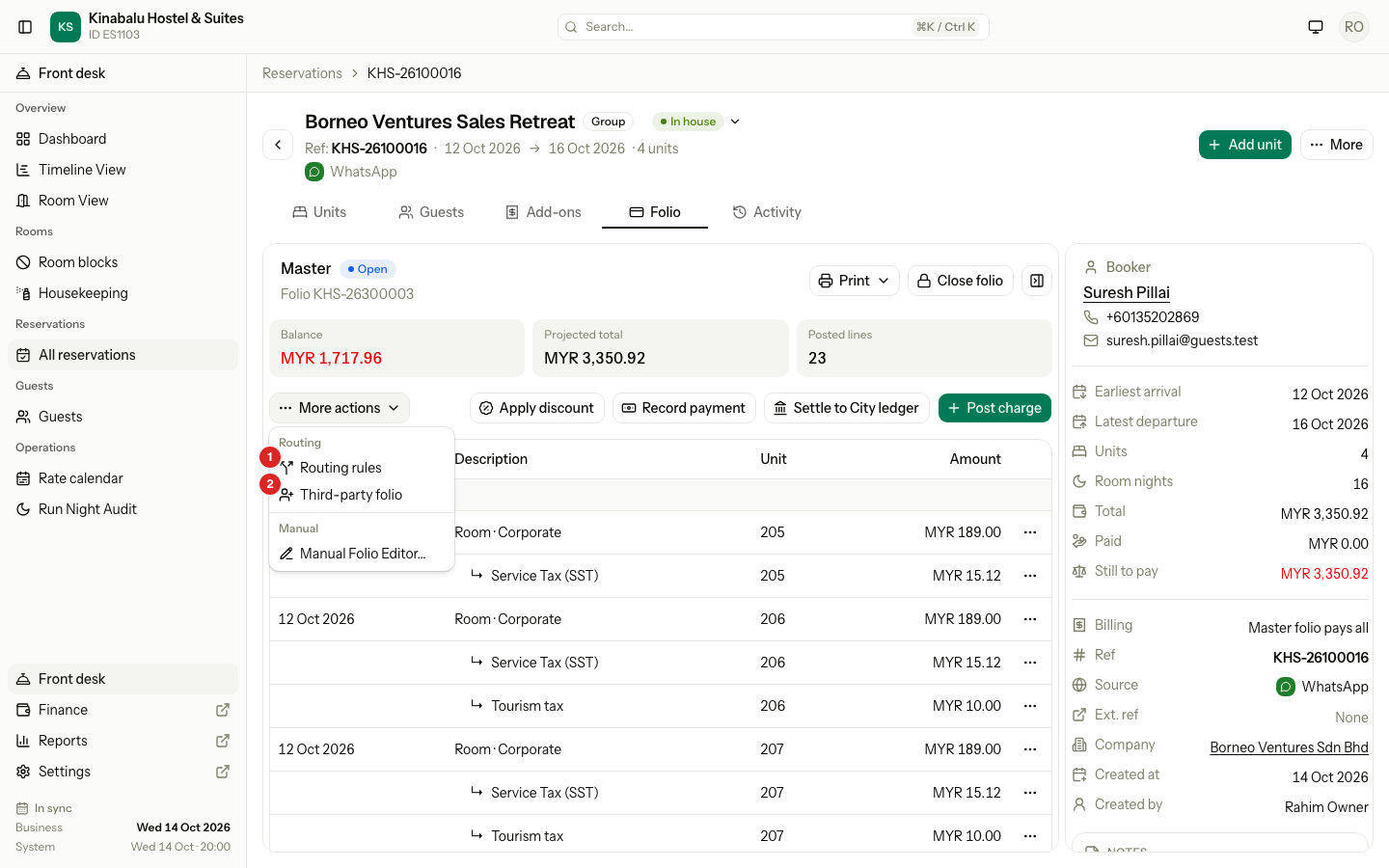
Open the reservation and select the Folio tab.
-
Select More actions, then Third-party folio.
-
Choose the Payer: Guest or Company. A company is "Settled to the city ledger".
-
Pick the guest or the company.
-
Select Create folio.
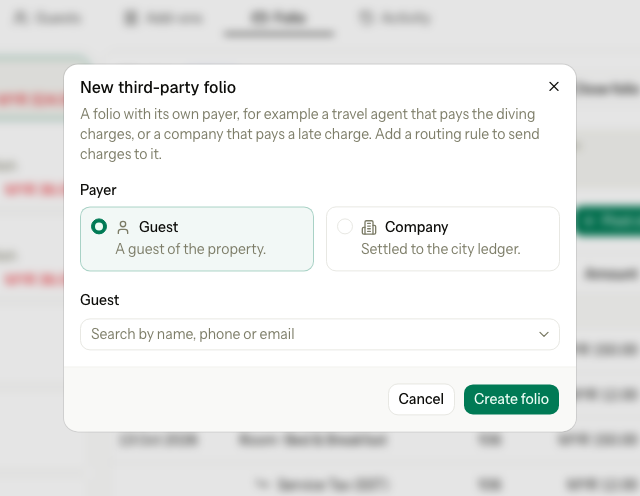
The new folio is Open and shows in the folio rail. It has no charges yet. Add a routing rule to send charges to it.
A third-party folio has no name of its own: its payer names it. You cannot delete or void it. If you do not need it, close it at 0.00.
Add a routing rule
- Select More actions, then Routing rules.
- Read the list of rules. Estatell adds the Billing mode rules. You add the Manual ones.
- Under Add rule, choose the Unit: All units or one room.
- Choose which Charges the rule takes:
- Category, then pick a Category such as Room.
- Charge code, then pick one Charge code such as a diving trip.
- All charges.
- Under Goes to, choose an open folio.
- Select Add rule.
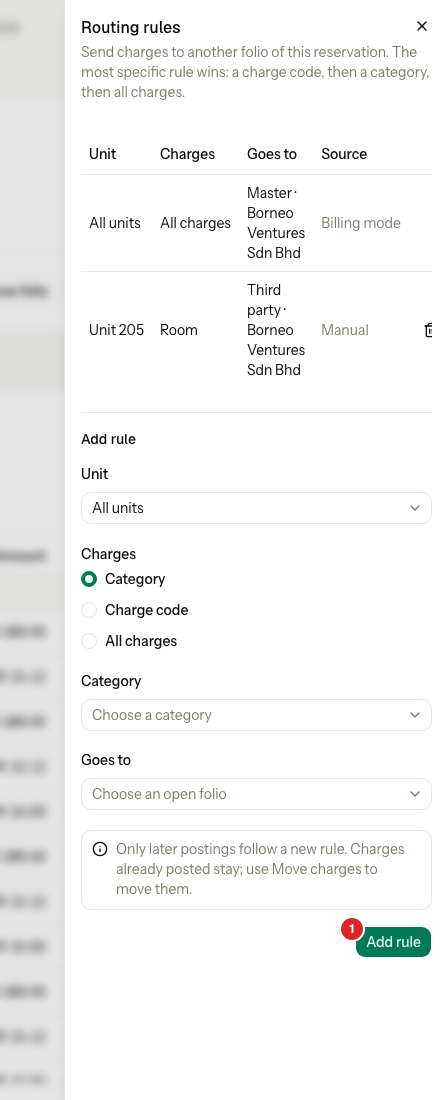
The sheet reminds you: "Only later postings follow a new rule. Charges already posted stay; use Move charges to move them."
To remove a rule, select the bin icon at the end of its row and confirm Remove routing rule?. You can remove Manual rules only. To change a Billing mode rule, change the billing mode of the booking.
Which rule wins
When more than one rule fits a charge, the most specific rule wins.
| Order | The rule names | Example |
|---|---|---|
| 1 | A charge code | Diving trips to the travel agent |
| 2 | A category | Room charges to the company |
| 3 | All charges | Everything to the Master folio |
At the same level, a rule for one room beats a rule for all units.
A rule only changes where a charge posts. These always follow their own rules:
- A tax or discount line goes to the folio of its charge. A charge and its tax never split.
- A reversal posts on the folio of the line it reverses.
- Move charges posts on the folio you choose.
Examples
| Situation | Rules | Result |
|---|---|---|
| The company pays the rooms, guests pay the extras | Master folio pays | Extras stay on each room's folio. |
| The company pays everything | Master folio pays all | Room folios stay empty. |
| The company pays the rooms, a travel agent pays the diving | Room to the Master folio, diving trips to the agent's folio | Everything else stays on each room's folio. |
| Room 1 pays for Room 2, and Room 2 pays for Room 1 | Manual rules: Unit 1 to the folio of Room 2, Unit 2 to the folio of Room 1 | Each folio holds the other room's charges. |
Bill to one guest
To make one guest pay on a bill of their own, use the Guests tab. This is not a routing rule: earlier charges stay where they are.
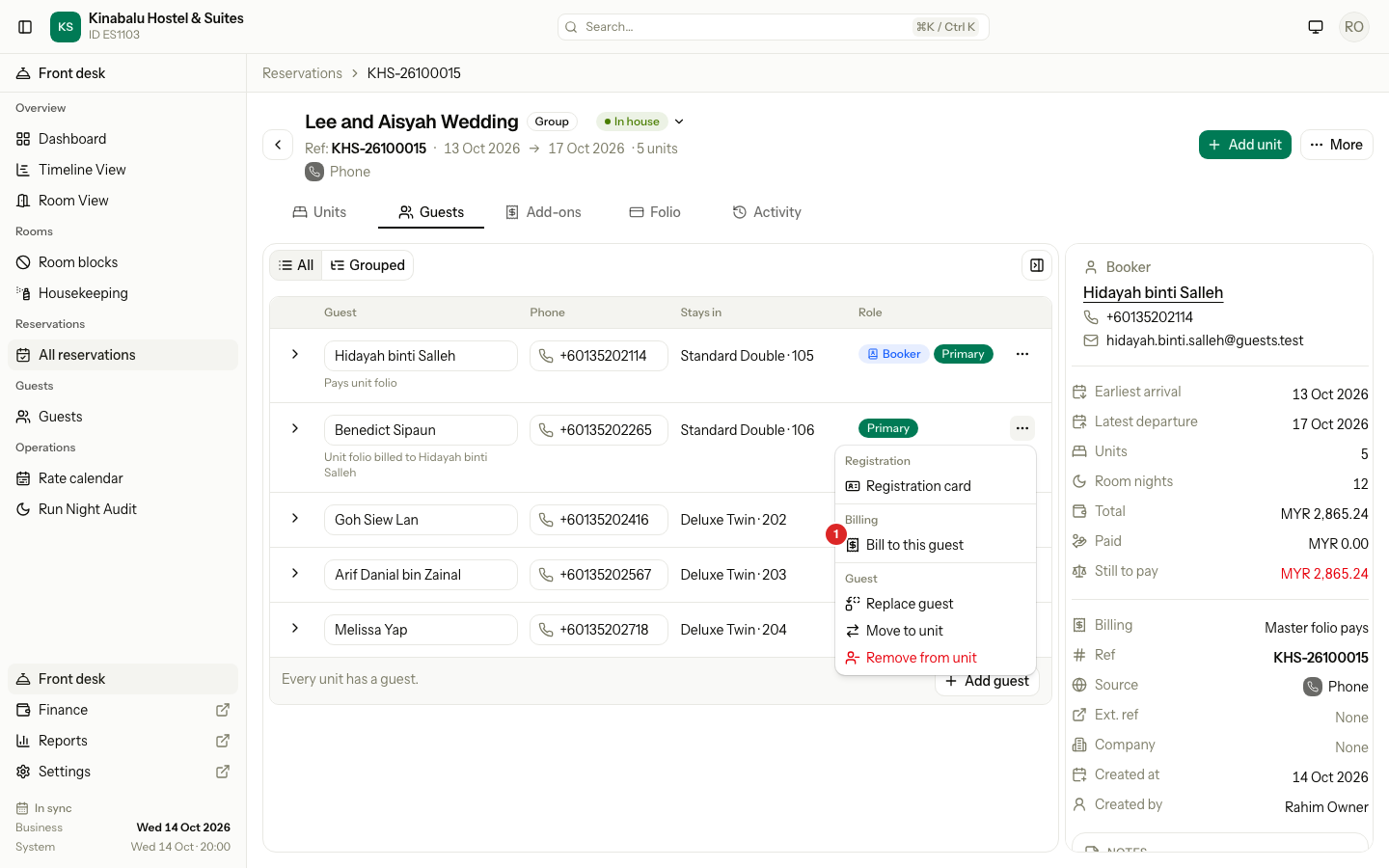
- Open the reservation and select the Guests tab.
- Select the ⋯ menu on the guest.
- Under Billing, select Bill to this guest.
| The guest is | What estatell does |
|---|---|
| The primary guest of the room | The room's own folio now has this guest as payer. |
| Another guest of the room | A third-party folio with this guest as payer. If one is already open, estatell uses it. |
Add a routing rule, or post a charge on the new folio, to send charges to it. The guest list then shows "Unit folio billed to" and the payer's name.
Special cases
| Situation | What happens | What to do |
|---|---|---|
| You add a rule after charges posted | The posted charges stay on their folio. | Use Move charges. |
| The folio that a rule points to is closed | The posting is refused: "This folio is closed. Reopen it on the folio tab first, then try again." The charge never falls back to the room's folio. | Reopen the folio, or change the rule. See Close and reopen. |
| The folio was settled to the City ledger | The posting is refused: "The folio these charges go to is settled to the city ledger. Open a third-party folio for the company, add a routing rule for this room and this charge category to it, then post again." | Follow the message. See AR invoices and payments. |
| You add a rule for the same room and charges twice | "A rule for this unit and these charges already exists. Remove it first." | Remove the old rule, then add the new one. |
| You choose a closed folio for a rule | "Choose an open folio." | Pick an open folio. |
| You try to remove a Billing mode rule | "This rule comes from the billing mode. Change the billing mode to change it." | Change the billing mode of the booking. |
| Bill to this guest on a guest who already pays | "This guest already pays the unit folio." | Nothing to do. |
| Bill to this guest when the room's folio is closed | "The unit folio is closed. Reopen it first, or use a third-party folio." | Reopen the folio, or make a third-party folio. |
| A company already has an invoice and a late charge posts | The settled folio cannot reopen. | Make a second third-party folio for the company, add a rule for that room to it, then settle it. |
| A cancelled or no-show room | "This unit is cancelled or a no-show, so it cannot be billed." | Bill another guest. |