
Walk-in
Book, check in and take payment for a guest who is at the desk now, in one save.
Use Walk-in for a guest who is at the desk now. One save books the stay, checks the guest in and takes the payment. For a guest who arrives later, use New booking.
Before you start
- Permission: Manage reservations and Check in. Add Record payment to take the payment on the same screen. Without it, the guest checks in and you take the payment on the folio later.
- For a day use guest who has already left: Check out as well.
- Set up first: the same as for a new booking.
Open the form
Open Reservations › All reservations, select New, then Walk-in. You can also use Walk-in in the quick actions on the Dashboard, or switch Reservation mode on a booking you already started.
The walk-in form
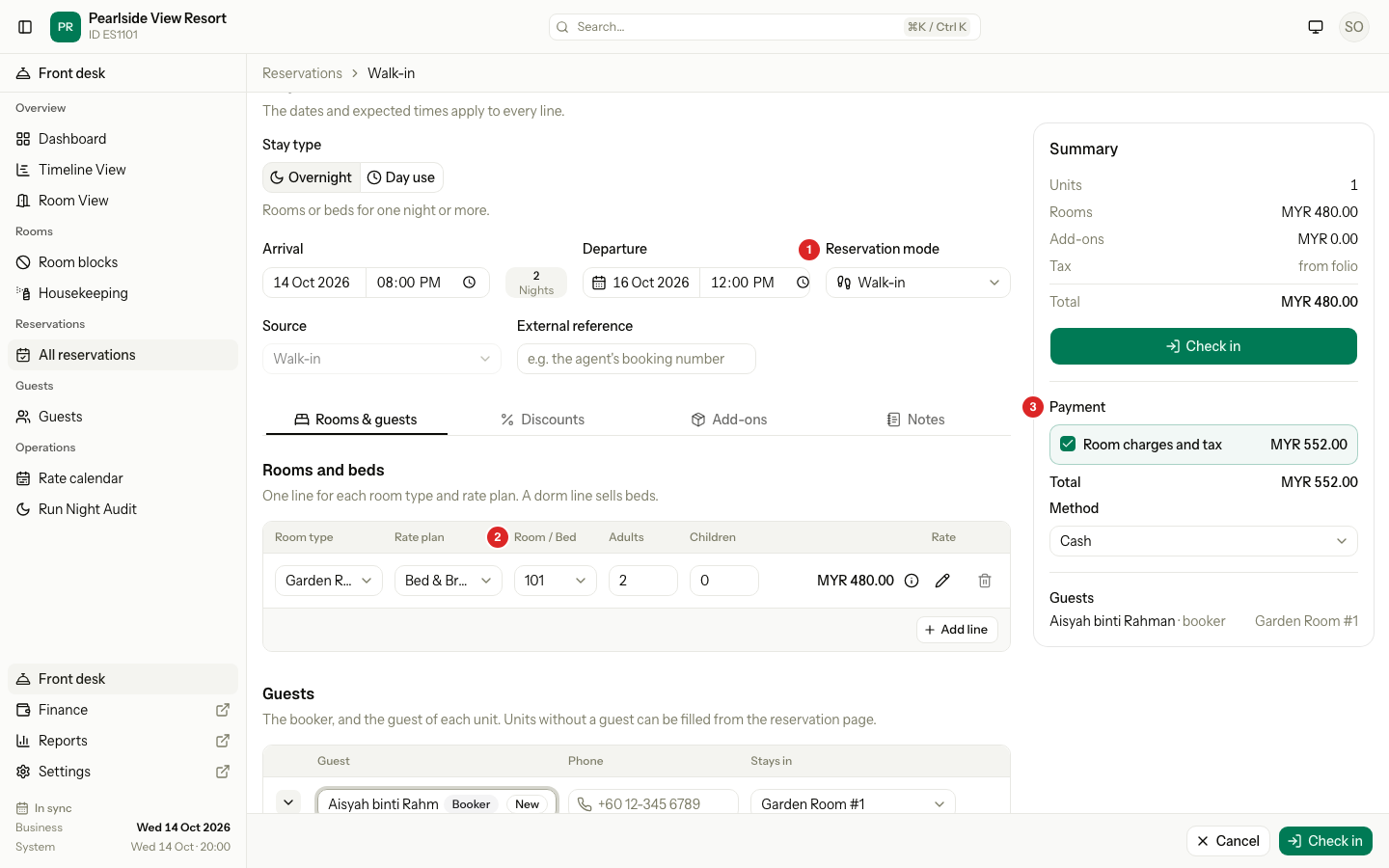
| # | Part | What it shows or does |
|---|---|---|
| 1 | Reservation mode | Walk-in. The arrival is today and the time now, locked. |
| 2 | Room / Bed | The room for the line. Required. |
| 3 | Payment | What the guest pays now. It shows once every line has a room and the booker has a name. See Take the payment. |
What is different from a new booking
| Area | New booking | Walk-in |
|---|---|---|
| Source | You pick it | Walk-in, locked |
| Arrival | Today or later | Today and the time now, locked |
| Room or bed | Optional | Required, unless your property turns on auto-assign. Rooms that are not ready show greyed out. |
| Summary | Total and tax | Total, tax and a Payment section |
| Main button | Create booking | Check in, or Save and check out for a day use guest who has left |
| After you save | Units are Confirmed | Units are Checked in, or Checked out |
When you switch from New booking to Walk-in, the arrival becomes today and the departure moves with it, so the number of nights stays the same.
Take the payment
The Payment section sits under the total in the summary. It shows only if you may record payments.
| Box | What it collects |
|---|---|
| Room charges and tax | The full bill of each unit: nights, add-ons and every tax, less booking discounts |
| Security deposit | The deposit for each unit. Hidden when your property sets no deposit. |
- Keep both boxes ticked to take everything now. Both start ticked.
- Pick the Method. For Card, Transfer and E-wallet, enter the Reference.
- Select Check in.
The amounts are read-only. For a guest who pays only part, untick the boxes and use Record payment on the folio.
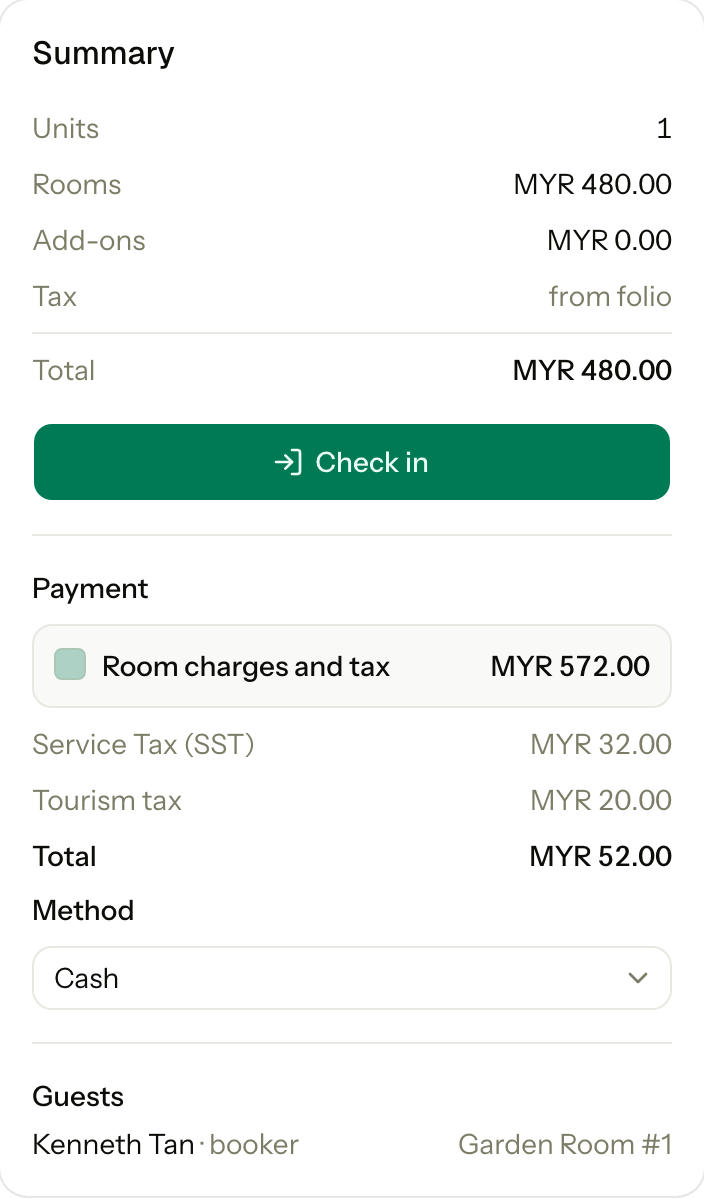
If Room charges and tax is unticked, one row per tax set to Collect at check-in takes its place, for example tourism tax.
Registration card
A walk-in guest has not signed a card yet, because the card needs the saved stay. If your property requires a signed card for check-in, the Registration card section shows.
- With Check in without card ticked, every unit checks in now. Only staff with that permission see the box.
- With it unticked, the units stay Confirmed. The guest signs, then you select Check in on each unit.
Day use walk-in
Switch Stay type to Day use for a guest who stays a few hours today. The date is today and cannot change. See Day use for the plan, the hours and the price.
The Start time can be earlier today, for a guest you enter after they came in. The guest is checked in at that time. For a start that has passed, the plan's Sold between hours and its smallest and largest number of hours are not checked.
Guest status shows for a day use walk-in:
| Guest status | When | What one save does |
|---|---|---|
| Still in house | The guest is in the room now. This is the default. | Books the room and checks the guest in at the start time. Check the guest out later as usual. |
| Already checked out | The guest came and left today. | Books the room, checks the guest in at the start time, posts the price, takes the payment and checks the guest out at End. The room turns Dirty. |
For Already checked out:
- Pick the Room type and the Rate plan.
- Set End to when the guest left, for example 13:40. It must be after the start and not later than now. The hours are rounded up: 10:00 to 13:40 is charged as 4 hours.
- Pick the Room and add the guest.
- Pick the payment Method, then select Save and check out.
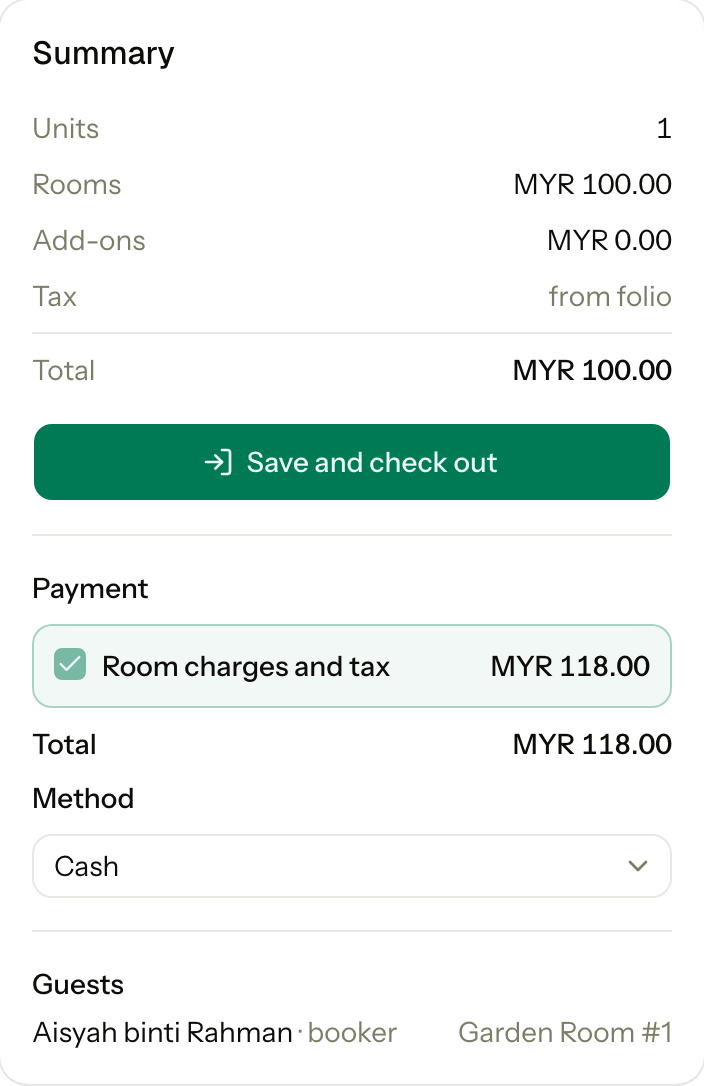
The guest has left, so the bill is paid in full now. Room charges and tax is ticked and cannot be unticked. No security deposit is taken.
After you save
The reservation page opens with a message such as "Reservation R-1042: 3 of 3 checked in · MYR 943.20 collected".
Special cases
| Situation | What happens | What to do |
|---|---|---|
| A room is not ready | It shows greyed out and cannot be picked. | Pick another room, or ask housekeeping to clean it. |
| A room line has no room | "Select a room." The payment shows "The payment shows once the booking can be saved." | Pick a room for every line. |
| A group walk-in, with one unit refused | The other units still check in. The refused unit stays Confirmed, and the message names the room and the reason. | Fix the reason, then select Check in on that unit. |
| The card is missing | The unit stays Confirmed. | Get the card signed, then check in the unit. |
| A company pays and billing is not Each unit pays | Room charges and tax is hidden. The company is billed, not the guest. The deposit still shows. | Take the deposit only, or none. |
| The total changed while you typed | The save is refused and nothing is booked. | Check the new total, then select Check in again. |
| You do not have the Record payment permission | The Payment section does not show. The guest checks in with no payment. | Take the payment on the folio. |
| A day use guest who left, but the night audit has not run | "Run the night audit first." | Run the night audit, then enter the day use. |
| A day use guest who left has not paid in full | "The unit folio is not settled. Collect the balance or refund the deposit first." | Take the full payment. Or pick Still in house, and check the guest out when they pay. |
| End is later than now | "The end cannot be after now." | Pick Still in house, and check the guest out when they leave. |
| A day use guest who left, with no signed card | The save is refused. The guest left before signing. | Ask someone who may check in without a card to enter it. |
| You do not have the Check out permission | Guest status does not show. A day use walk-in is Still in house. | Check the guest out later, or ask someone who may check out. |
| A day use on an earlier day | Walk-in takes today only. | An owner or manager enters it as a Past stay. |